GSA 10.2 Release Notes
Major changes in GSA 10.2
Improved loading capabilities
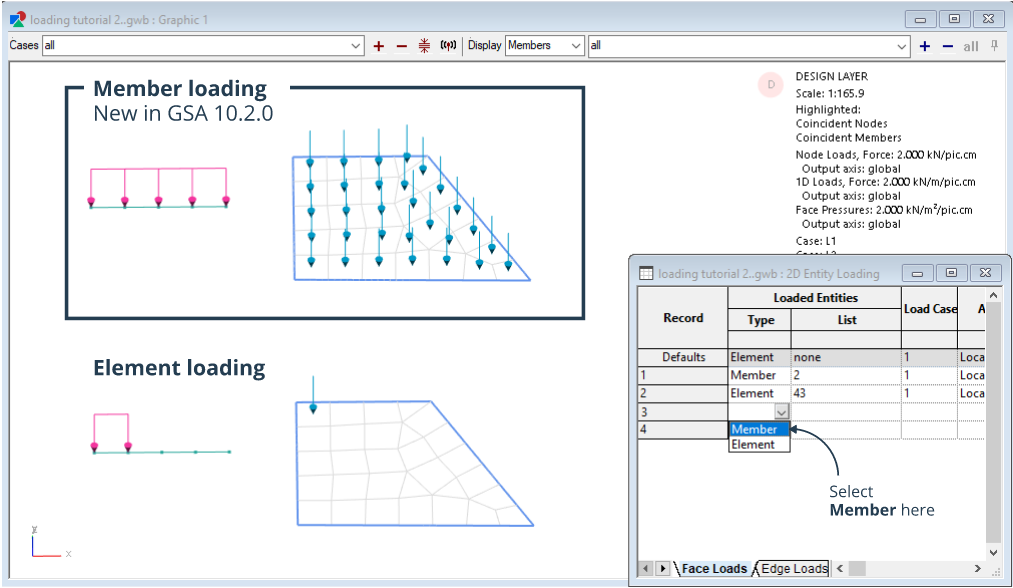
Apply loading on members in the design layer
You can apply loads to all types of members in the design layer. This loading will be transferred to elements in the analysis layer, even after re-meshing. You can also now view applied load diagrams in the design layer.
Member element loading section has more information.
Apply equation face loads on 2D members and elements
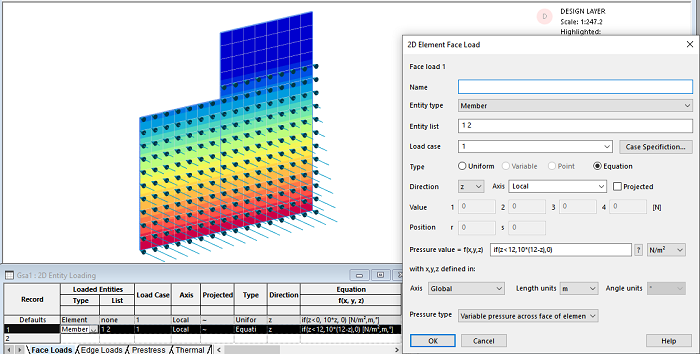
Map face loads onto 2D members and elements using an equation. The equation is saved in the face loads table and remains editable. Only one face load is generated per equation.
Mapping loads based on equation section has more information.
New load panel members and elements
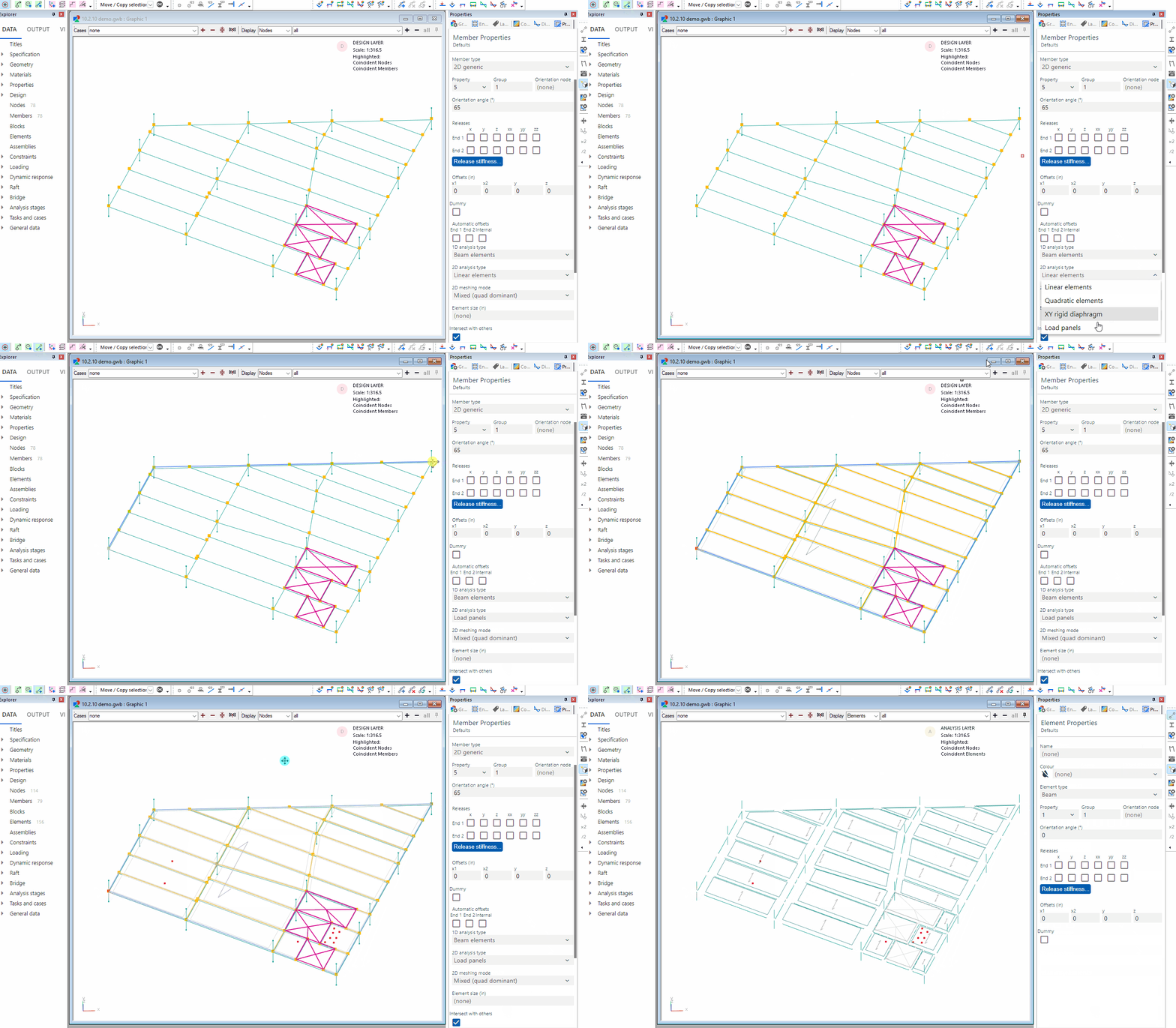
Create hundreds of load panel elements simultaneously with the new load panel 2D analysis option for 2D members. One-way and two-way spanning load panels can be of any shape or size, with span direction for one-way panels determined by the local x-axis.
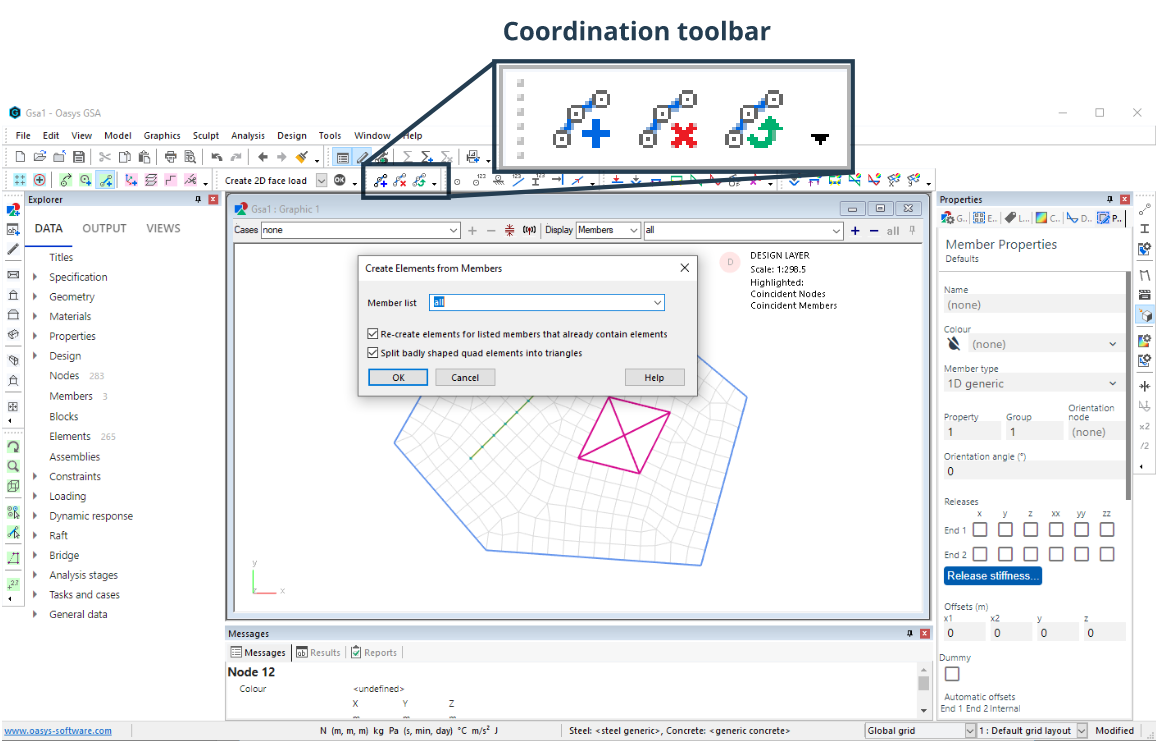
Coordination toolbar
Coordinate the analysis and design layers with one click using the new toolbar buttons to create elements and synchronise the two layers.
Design and analysis layers section has more information.
Custom output views
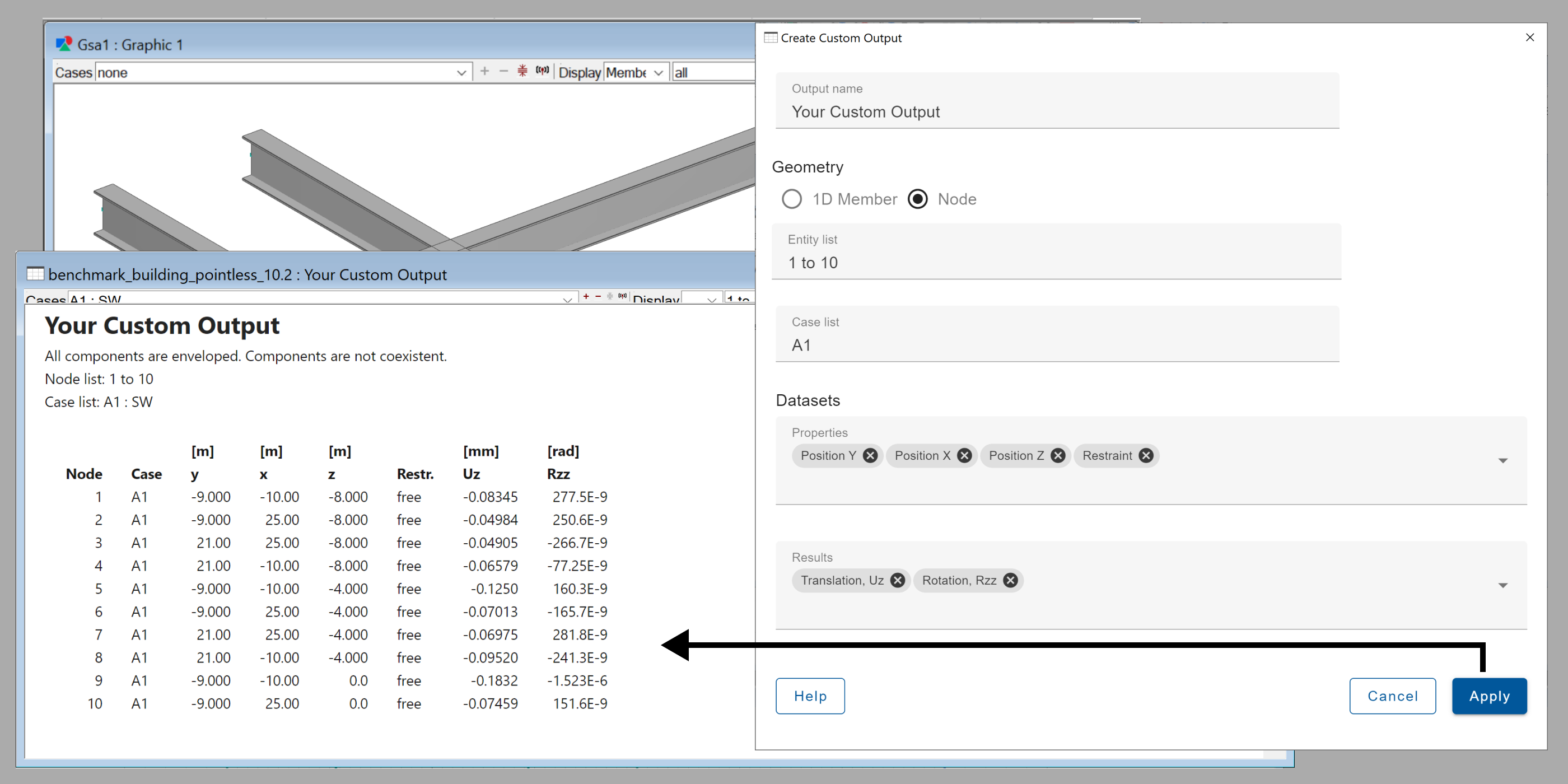
You can create custom tables that combine properties and result for 1D members and nodes without the need for other software (for example Excel) to combine the tables. Simply copy and paste these output templates between models using GWA format.
Custom output views section has more information.
New modal analysis options
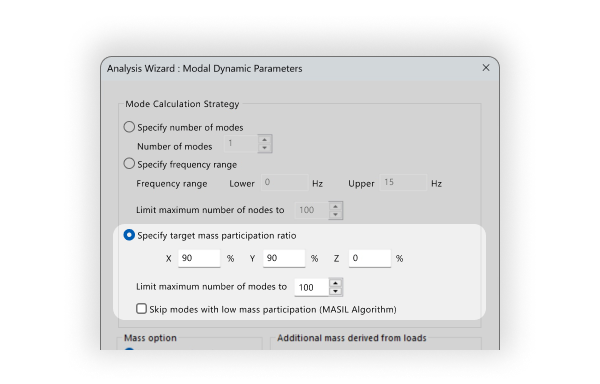
Specify your criteria and GSA will find the modes you care about. You can specify a desired target mass participation ratio or frequency range for Modal and Modal P-delta analysis tasks
Build 10.2.19
September 2026
This is a hotfix release to address a security issue.
Build 10.2.18
October 2025
This is a hotfix release to address some issues related to GSA crashing or freezing.
Fixes
- Section elements with both ends released whose nodes are in non-global constraint axes are now handled correctly. [GSA-9651]
- Displaying loads no longer crashes or hangs GSA [GSA-9602]
- Running an analysis with tapered elements that include reverse tapering offsets no longer hangs or crashes GSA [GSA-9603]
- The "Unknown link property" error is no longer raised when using custom link properties [GSA-9604]
- Viewing analysis results no longer crashes GSA [GSA-9607]
- Analysing a model no longer crashes GSA [GSA-9609]
- Face loads expansion no longer crashes GSA or prevents analysis [GSA-9648]
- Viewing buckling displacements no longer freezes the graphics view [GSA-9649]
- The cryptic "net constraint force" warning has been removed [GSA-9401]
If any analysis results are affected by the following bugs (which are now fixed), the results will be erased when the model is opened in the new GSA version.
- Fix for loading of elements with taper offsets [GSA-9617, GSA-9622, GSA-9625]
- Grid line loads that coincide exactly with 2D element edges are not applied twice anymore [GSA-9628]
Build 10.2.17
August 2025
This release consists primarily of bug fixes.
Fixes
- The code creep option for stages no longer gives wrong warnings about code being missing after being invoked. [GSA-9156]
- Pasting to the section modifiers table now correctly pastes the J section modifier. [GSA-3088]
- A crash during Explicit nonlinear analysis is no longer reproducible. [GSA-4285]
- GSA now supports importing PDisp 20.1 files. [GSA-4746]
- Member results are now correctly output when members are part of blocks. [GSA-4956]
- Property and Message panes are now correctly positioned on high-resolution screens. [GSA-5488]
- The access violation crash when running analyses via the GSA API is no longer reproducible. [GSA-6202]
- Terminating analysis of ties and struts is now significantly more responsive. [GSA-7333]
- Large imperfections no longer affect the element orientations. [GSA-7758]
- Applying imperfections no longer causes significant slowdowns during analysis. [GSA-8058]
- When the generic steel design code is selected, the utilisation ratio is now shown when greater than 1 in the verbose steel design output. [GSA-8258]
- The "What's New" window is not shown if you chose to cancel closing GSA after being prompted to save changes. [GSA-8327]
- The section properties wizard will now display correct values even in post analysis state. [GSA-8948]
- When performing bridge load optimisation, invalid load panels are now ignored. [GSA-9030] [GSA-9043]
- In some instance GSA would create empty load panels which could then cause problems. These null panels are now excluded. [GSA-9043]
- GSA now explains analysis failures in a response spectrum analysis when the results cannot be initialised. [GSA-9048]
- When setting up Response spectrum analysis, users can now modify "Combination of basic responses" when only one direction is active. [GSA-9052]
- GSA includes lump inertia option for modal and Ritz analysis. [GSA-9185]
- Polylines are set to the local grid plane by default. [GSA-9394]
- When running a nonlinear analysis with constraint equations, constraint forces and moments are now correctly displayed in output views. [GSA-5719]
- Grid line loads on 2D elements are now correctly handled when polylines coincide with element edges. [GSA-6770]
- GSA now flags an error when a rigid constraint's primary node is undefined, instead of silently ignoring it. [GSA-9298]
If any analysis results are affected by the following bugs (which are now fixed), the results will be erased when the model is opened in the new GSA version.
- Moment loads can now be applied to link elements. [GSA-7572]
- Moment loads can now be applied to rod, bar, tie and strut elements, but torsional moments are only permitted on rod elements. [GSA-7573]
- Section modifiers are now correctly applied across all load types. [GSA-9029]
- Analysis results for 1D elements with applied property modifiers are now accurately computed. [GSA-9046]
- Analysis is disabled for unsupported layered shell 2D elements. [GSA-9213]
- Thermal loads are now correctly applied to non-solid 2D properties. [GSA-8821]
- The geometric stiffness of cable elements is now calculated correctly. [GSA-9433]
Documentation updates
- Redirect links to the new documentation site [GSA-7445]
- Updates to documentation on applied displacements [GSA-4859]
Build 10.2.16
June 2025
This release contains mostly bug fixes and the re-enablement of class 4 checks, as per BS EN 1993-1-1:2005.
Features
- Re-enabled class 4 steel member checks to BS EN 1993-1-1:2005. [GSA-9338]
Fixes
- Fixed the slenderness checks related to EN - RHS section. [GSA-9349, GSA-9042, GSA-9357]
- Resolved the issue of unexpected large axial force in released elements not in equilibrium with connected elements. [GSA-9336]
- Reverted changes related to warnings added in GSA-9131. [GSA-9348]
Build 10.2.15
May 2025
This release fixes a small number of critical bugs.
Fixes
- When a task's results are deleted due to a bug, all its dependents tasks will be deleted as well. [GSA-9218]
- Three bugs that cause GSA to crash are resolved. [GSA-9269, GSA-9270, GSA-9279]
Build 10.2.14
April 2025
This release contains mostly bug fixes, in addition to a few new additions to the .NET API.
Please note that design checks of Class 4 steel members and analysis of layered shells has been disabled until underlying issues in the checks and analysis are resolved in a future release.
Features
- The .NET API exposes 2D edge loads. [GSA-5538]
- Modal analysis tasks are exposed in the .NET API. [GSA-8398]
- The .NET API exposed a function
CreateDefaultAnalysisCasesForTheTaskto create default analysis cases consistent with the GSA UI. [GSA-8953]
Fixes
- User modules can be imported in GWA format without restrictions. [GSA-3853]
- Torsional constant, C, is correct for solid rectangular sections. [GSA-5160]
- Nodal inertias are reported in modal dynamic, Ritz, and mass analyses. [GSA-5632]
- The Eurocode spectrum in GSA includes a separate vertical behavior factor in addition to the horizontal behavior factor, q. [GSA-5650]
- Member internal restraints adjust based on graphic view inputs. [GSA-6155]
- Formfinding analysis can be executed through the C++ API. [GSA-6295]
- Thermal loads on 2D elements are correctly handled for Allman-Cook elements. [GSA-6300]
- Contours work correctly even when overlapping polylines are present. [GSA-6684]
- GSA will no longer crash while manually expanding grid loads after a failed analysis caused by a poorly formed panel. [GSA-6846]
- Resolved syntax issues with "and" operators and brackets in list interpretations (e.g., "(PA1 and G1) PA2" and "PA2 (PA1 and G1)" produce the same entity list). [GSA-7306], [GSA-6713]
- The GSA API can extract a large number of combination cases without freezing. [GSA-7582]
- Total loads and reactions are balanced when constraint equations are applied. [GSA-7621]
- The total mass used for calculating effective mass ratios is consistently based on unfactored mass, avoiding ratios exceeding 100%. [GSA-8083]
- The GsRelax task runs through the .NET API without exceptions. [GSA-8180]
- Tri3 elements with Allman-Cook drilling DOF formulation yield consistent results regardless of node order or element orientation. [GSA-8371]
- Total loads and reactions are balanced when compression/tension-only spring restraints are used. [GSA-8393]
- The Beam Section Summary accurately calculates the surface area of tapered elements. [GSA-8396]
- Diagrams are consistent across the platform. [GSA-8746]
- Geometrical entities in large models can be modified without causing crashes. [GSA-8761]
- When the 2D contour center only option is selected, both the top and bottom surfaces of elements are displayed. [GSA-8778]
- Unit conversion for the additional mass field is correctly displayed based on user-specified units. [GSA-8798]
- A warning is issued regarding the upcoming removal of explicit solver options. [GSA-8806]
- Users can modify the maximum plastic/elastic ratio in the wizard, which is accurately reflected in verbose design reports. [GSA-8812]
- Reaction forces and moments are calculated for nodes with applied displacements. [GSA-8846]
- Incorrect error messages about applied displacements in restrained directions have been removed. [GSA-8848]
- The GSA API allows analysis tasks to be imported from one model to another. [GSA-8871]
- The total mass of the structure includes specified lumped masses without adjustments for modifiers. [GSA-8878]
- Harmonic analysis setup allows the inclusion of natural frequencies within the excitation range. [GSA-8937]
- Analysis cases can be created and accessed through the .NET API. [GSA-8954]
- GSA correctly calculates total and active mass and inertia, accounting for directional differences in active mass. [GSA-8955]
- Loads on tapered beam elements consider the defined start and end positions rather than defaulting to 0% and 100%. [GSA-8980]
- When the 2D contour center only option is selected, both the top and bottom surfaces of elements are correctly displayed. [GSA-8983]
- Section modifiers are included in gravity load calculations. [GSA-8999]
- Modified section properties are consistently used for calculating loads on 1D elements. [GSA-9010]
- Printing graphic views to PNG/JPEG generates images in the expected resolution. [GSA-2623]
- Cable deflections are displayed correctly on the design layer. [GSA-4578]
- Member deflections are calculated correctly when intermediate connections are present. [GSA-4694]
- Beam restraint graphics correctly represent spans. [GSA-4816]
- Shear modulus for standard aluminum materials does not default to zero. [GSA-5678]
- Member restraints are displayed correctly even when user overrides are specified. [GSA-5778]
- The .NET API Analyse function accurately reflects analysis success or failure. [GSA-6240]
- Contours of Grid Area Loads are not distorted for specific polyline coordinates. [GSA-6686]
- Australian channels correctly provide a non-zero Zz value. [GSA-6744]
- Deleting intermediate nodes does not deletes associated members. [GSA-6865]
- Element taper offsets are immutable in the element definition wizard when results exist. [GSA-7109]
- The maximum number of iterations and tolerance are correctly applied by the Spectra eigen solver. [GSA-7119]
- The GSA .NET API successfully returns results for CombinationCase queries with numerous permutations. [GSA-7141]
- Effective length calculations account for the load height factor (kl). [GSA-8124]
- The Sculpt command "Create 2D edge load..." does not include load panels in the element list. [GSA-8502]
- Copying elements correctly duplicates loads for all elements and nodes. [GSA-8822]
- Fixed a crash when opening the type dropdown in beam properties after analysis. [GSA-8832]
- Resolved a crash caused by releasing element ends in the graphic view for large models. [GSA-8858]
- Fixed incorrect results or crashes for 3D element P-delta analysis when geometric stiffness is defined by an existing result case. [GSA-8862]
- Addressed graphics freezes when displaying the Section view of a 2D element connected to a 3D element. [GSA-8869]
- Reading incorrectly formatted GWA files produces a warning, preventing model data corruption. [GSA-8935]
- Users will now see an error message if class 4 sections are used in the steel designer, as these sections are not supported in the design checks yet. Utilisation checks will be skipped. [GSA-9131]
If any GSA models are affected by the following bugs (which are now fixed), any results will be erased when the model opens:
- Load on strut and tie elements now respect compression / tension only conditions. [GSA-9093, ANA-2041]
- Corrected force calculations in cases where struts incorrectly reported tension and ties incorrectly reported compression, typically for thermal or pre-strain loads. [GSA-7570]
- The total mass used for calculating effective mass ratios is now consistently based on unfactored mass, avoiding ratios exceeding 100%. [GSA-8083]
- The total mass of the structure now includes specified lumped masses without adjustments for modifiers. [GSA-8878]
- Total loads and reactions are now balanced when compression/tension-only spring restraints are used. [GSA-8393]
- Tri3 elements with Allman-Cook drilling DOF formulation now yield consistent results regardless of node order or element orientation. [GSA-8371]
- Layered shells are no longer passed to the solver as they are not supported. [GSA-8796]
- Loads on tapered beam elements now consider the defined start and end positions rather than defaulting to 0% and 100%. [GSA-8980]
- Total loads and reactions are now balanced when constraint equations are applied. [GSA-7621]
- Thermal loads on 2D elements are now correctly handled for Allman-Cook elements. [GSA-6300]
- The effect of section modifiers is now included in the calculation of gravity loads. [GSA-8999]
Build 10.2.13
November 2024
GSA 10.2.13 is a minor version that introduces a fix in the .NET API.
Fixes
.NET API
- .NET API uses tolerance to validate footfall walking frequency range. [GSA-8924]
Build 10.2.12
September 2024
GSA 10.2.12 includes a number of fixes in addition to new features in the .NET API.
Features
.NET API
- Reports on member-element synchronisation can be extracted using the .NET API. [GSA-7338]
- Imperfection can be applied to relevant analysis tasks using the .NET API. [GSA-8304]
Fixes
Analysis
- Resolved issue with results when running a static analysis with nonlinear elements and there are multiple analysis cases in a single task. [GSA-5626]
- Resolved crashing when requesting only a single mode for modal analysis. [GSA-6154]
- The Normalise model mass option in modal dynamic analysis works correctly. [GSA-7595]
- A typo in the pre-analysis warning messages has been fixed. [GSA-8663]
- The degrees of freedom are set correctly for the primary node at joints, so that degrees of freedom are not lost. [GSA-8679]
- When the beam element is connected to only the shell element, the beam end moment is calculated correctly in nonlinear analysis. [GSA-8629]
- Fabric material grade cannot be edited when it is used by an analysis case with results. [GSA-6080]
Loading
- Resolved crashing when pasting invalid values into the loading tables. [GSA-7938]
- GSA gives a descriptive warning message when trying to apply unacceptable loads on load panels. [GSA-8387]
- The Delete displayed loading function works properly when deleting loads from elements that have multiple load cases associated with the displayed load. [GSA-8467]
- New loads cannot be added from load tables if the load case of the new load is locked. [GSA-5977]
- Resolved crashing when creating load panel elements from load panel members and the member geometry is too complex for GSA to handle. [GSA-8739]
- Joining two elements and undoing will not lead to loss of loads and the loading values will be reported correctly. [GSA-7211]
Results
- Resolved issue of diagrams in the design layer being inconsistent with the analysis layer. [GSA-8627]
- The bending moment diagram and shear force diagram are drawn correctly for explicit members. [GSA-8271]
- 2D element stresses are correct when the 2D elements refer a 2D property that is of type hollow. [GSA-8706]
- Resolved issue of incorrect assembly forces when the assembly has 2D elements with hollow type properties. [GSA-7677]
- Storey drift results are correct in Response spectrum details output. [GSA-6971]
- Section modulus of taper element is calculated correctly. [GSA-5360]
- Distribution of storey forces when T > 0.7s are reported correctly for NBCC 2015. [GSA-7038]
Design
- Resolved crashing when running a steel design task when the model contains member loading. [GSA-8071]
- Explicitly defined lateral torsional buckling effective length is correctly used in member design for Australian code AS4100-1998. [GSA-8228]
- The example file Steel design simple provides appropriate steel design task results. [GSA-7787]
- Member LT buckling effective length is now affected by member constraints for Eurocode. [GSA-7905]
- User defined lateral torsional buckling effective length is used correctly in steel design for American codes. [GSA-7027]
General
- Creep coefficient remains locked when model has results. [GSA-5667,GSA-5909]
- Wizard does not allow editing rows of a table when model is analysed. [GSA-5963]
- Deleting rows in the Soil material curves and Pile-soil interaction tables does not influence the numbering of other items. [GSA-6019]
- The equivalent soil nodal stiffness is set correctly for the nodes with a maximum soil pressure limit after raft analysis. [GSA-6710]
- GSA does not delete the whole element list entity when one of its elements is deleted graphically. [GSA-6866]
- A warning is provided to inform users that changing the structure type will change all existing 2D elements to plane stress elements. [GSA-7890]
- Resolved crashing when inputting invalid storey list in the assembly definition. [GSA-7939]
Build 10.2.11
August 2024
GSA 10.2.11 is a minor version to resolve two issues related to opening of existing models and deleting entities from models.
Fixes
- Resolved crashing when opening an older GSA model that contains 1D members connected to a load panel element. [GSA-8713]
- Resolved slowdown when deleting elements or nodes from a model. [GSA-8715]
Build 10.2.10
July 2024
GSA 10.2.10 introduces new load panel members and elements. It also includes a number of fixes targeting analysis warnings, design result contours and general GSA operations.
Please note that if you're using the GSA Grasshopper Plugin, please update it to version 1.4.0 in order to use it with this build of GSA.
Features
Loading
- 2D members can be defined with a 2D analysis type of load panels. [STR-101] When this option is selected, load panel elements are created in the analysis layer using a type of meshing that only creates one load panel element per structural bay.
- Load panels elements in the analysis layer are their own element type instead of a special type of Quad4 or Tri3 element. [STR-27] These load panel elements do not have any stiffness but can distribute uniform face loads to the surrounding 1D entities based on the user's desired load distribution characteristics.
- To create a load panel element, select load panel in the element type dropdown.
- Load panels elements can be defined by an ordered list containing three or more nodes and reference 2D properties to define its load distribution characteristics.
- There are two new types of load distribution options available in 2D properties for load panel elements. [STR-27]
- Two-way: Two-way load panel elements distribute load to the nearest edge.
- One-way: One-way load panel elements distribute load to the nearest edge in the direction of its local x axis. To change the span direction, change the load panel element's orientation angle and/or the 2D property's axis system.
- The legacy load distribution options remain available but they can only be used on load panel elements that are defined by either 3 or 4 nodes.
General
- The topology definition in the elements table and elements wizard is combined into a single field. [GSA-7696]
Fixes
Analysis
- 1D element axial strain results are calculated based on deformed geometry for nonlinear analyses. [GSA-5670]
- Proper warning message is given when running modal buckling analysis is not able to locate any eigenvalues. [GSA-6189]
- Resolves crashing when analysing a model when a load panel reference edge is set to an invalid value. [GSA-6645]
- A descriptive warning message is now given when an equation face load is applied to a load panel [GSA-8261]
- GSA will warn if the face loads on load panels do not completely expand. [GSA-8513]
Design
- Steel design contours update after a design task completes. [GSA-6685]
- RC slab contours' averaging option is fixed to be responsive to the input. [GSA-6281]
- RC slab contours updates when reinforcement materials are modified. [GSA-6228]
- The default contour values for RC slab reinforcement when using design codes that use imperial units have been fixed. [GSA-6274]
General
- Incorrect representation of load panel element offsets in the graphic view has been resolved. [GSA-4889,GSA-7580]
- Copying an element with the copy references option selected ensures that all lists that refer to the original element also refers to the copied element. [GSA-5569]
- The definition of 2D element offset in GWA has been changed from UNIT_LENGTH to UNIT_DISP. [GSA-5699]
- Undoing and element deletion does not create a false selection for the element. [GSA-7209]
- When opening older models containing nonlinear static analysis cases, the residual control setting is retained. [GSA-6053]
- The base shear, fundamental period and base level inputs in the equivalent static load dialog are applied according to the units displayed (previously they were always taken in SI units, despite the input labels indicating otherwise). [GSA-6267]
- Load cases generated by bridge load optimisation are assigned to the variable imposed (live) load category. [GSA-6276]
- Mass option in analysis wizard has updated wording to clarify the different options. [GSA-7273]
- The stage material table is unlocked correctly after the analysis results are erased/deleted. [GSA-7700,GSA-8013]
- Release page of element table greys out unused fields correctly. [GSA-8034]
- Offset page of element table greys out Taper offset correctly. [GSA-8035]
- Stage materials and stage properties, does not allow a stage definition in the dropdown menu when the model contains results corresponding to the specific stage definition. Additionally, stage materials is now unlocked as expected on deleting the model results. [GSA-8202]
- Label for orientation angle can be displayed on 2D elements. [GSA-8413]
- Material grade label in graphics updates after the material definition is changed. [GSA-8457]
- GSA points out the cause if manual expansion of loads on load panels are unsuccessful. [GSA-8469]
- The expanded beam loads from load panel load is correct for cantilever load distribution type. [GSA-8533]
- Only uniform loads applied to load panels are expanded when using the load expansion tool. [GSA-8557]
- The 2D property profile description is no longer included when viewing a load panel element's property. [GSA-8569]
- File saved by GSA 10.2.8 with load panel 2D properties can be opened correctly. [GSA-8602]
- In the long term creep definition dialog, the calculation for the creep coefficient uses thickness and slump values with the correct units. [GSA-7653]
Build 10.2.9
May 2024
GSA 10.2.9 is primarily focussed on fixes to critical issues reported in GSA.
Features
.NET API
- Footfall analysis task definition can be accessed using the .NET API. [GSA-8336]
- An analysis task can be created using the factory method, independent of the model data. [GSA-8244]
- Drawing entities of an assembly's geometry can be retrieved using the .NET API. [GSA-8278]
- DiagramType enums include displacement data references that can be used to retrieve drawing entities using the .NET API. [GSA-8279]
- Resolved assembly result diagrams are available through the NET API. [GSA-8287]
Fixes
Dynamics
- Analysis tasks that require mass now clearly specify it to be nodal mass. [GSA-8283]
- Dynamic details are now available for models with Taper beam elements analysed using Ritz and Ritz P delta analysis. [GSA-5932]
- GSA now checks that there are sufficient mass degrees of freedom for a mode, instead of failing to solve. [GSA-5946]
- Modes normalised to a unit displacement are now correctly scaled. Previously, in some instances, modes were normalised to a unit rotation. [GSA-7560]
- When erasing results using the Manage tasks dialog box, results from dependent tasks (e.g. a footfall analysis that depends on modal analysis results) are also erased. [GSA-5392]
- Response spectrum analysis no longer produces a Response in z case when there is no vertical response spectrum defined in the used code. [GSA-7418]
Design and analysis layers
- 1D element deflection contours now reliably display on the design layer. [GSA-5605]
- 2D member's local axis automatically updates when the member's property's axis is changed. [GSA-5885]
- 2D property thickness can no longer be modified in the wizard when the model has been analysed. [GSA-5982]
- Element attributes are all locked after analysis. [GSA-5876]
- It is no longer possible for new elements to be added to the model after there are analysis results. [GSA-5314]
- Member loads on load panels are now applied as expected. [GSA-8285]
- Create members from elements now works correctly in both GSA 10.1 and 10.2. [GSA-7415]
- Member geometry check status now correctly changes after updating the constitutive elements. [GSA-7594]
- Deleting elements will no longer clear the 1D thermal loads table. [GSA-7924]
- Splitting elements will no longer delete the distortion load records. [GSA-8027]
Analyses and results
- Averaging the 2D forces derived from ‘2D element forces and 2D/3D stresses at centre only' at time of analysis produces output views that match contours where the 'average values at nodes' option is checked off. [GSA-6072]
- In a P-Delta analysis the reaction forces are now calculated using the elastic and geometric stiffness. This ensures that there is balance between total loads and reactions. [GSA-5676]
- In an analysis involving analysis stages there was an issue where a node has a spring support. If this is overridden by a restraint in the analysis stage, the reaction is now calculated at this restrained node. [GSA-8155]
- In some instance GSA would crash when unable to find any eigenvalues. It now reports that none can be found as an error message. [GSA-8256]
- Nonlinear implicit solver parameters are no longer accessible through GWA. [GSA-6016]
- The analysis results option to store total load and reaction results now works when reaction results are switched off. [GSA-7903]
- The element strain energy is now corrected correctly for P-Delta and buckling analysis, excluding the geometric stiffness. [GSA-8164]
- The graphic view needs to be updated every time when there is a change in values. [GSA-6917]
- When establishing the degrees of freedom at a node, the node spring and mass properties are checked. In some instanced the check was for the wrong property, leading to missing or unassigned degrees of freedom. [GSA-8346]
- After a failed analysis attempt, the failed cases no longer appear as if they have results. [GSA-7995]
- While extracting results of assemblies created by including link elements will display the results for links also. [GSA-8081]
- Made changes to shift the end points by 1% only if the end points of an assembly are the topmost and bottommost points in the assembly. [GSA-5275]
- The calculation of 2D element projected stress results for 2D properties with in-plane stiffness modifiers has been corrected [GSA-8501]. The wrong values were produced by GSA versions 10.2.7 and 10.2.8, which also affected assembly results derived from those values [GSA-8397]. When opening a model saved by the affected versions, the invalid results will be erased, and you will be required to re-analyse the model.
General
- Error message is now given if there are ambiguous stage material definitions in a model. [GSA-7701, GSA-6011]
- GSA now correctly warns about the use of nonlinear elements (ties, struts, cables and nonlinear springs) for modal analysis, where they are treated as linear and for non-modal analysis, where they cause the solver to become iterative. [GSA-5949]
- If LT buckling effective length is explicitly defined by the users, it will be used to determine the LT buckling capacity and member and member restraints are irrelevant in this case. [GSA-7761, GSA-7848]
- Maximum and minimum stresses (C1 and C2) on beams with reflected asymmetrical sections have been corrected. [GSA-5561]
- Rebar calculations use the design strength as specified in the Slab Design tab of the Rebar Grade Properties even if the design strength has been modified by the user. [GSA-5477]
- Shear capacity checks are now correct for steel design code SANS 10162-1:2011. [GSA-6399]
- The .NET API does not include the result for the dummy element. [GSA-8236]
- The modifiers fields on 2D property table are correctly greyed out corresponding to the types of elements. [GSA-8315]
- The polyline coordinates table remains visible after using the Modify tool to update values. [GSA-7541]
- Torce line for combination cases have been corrected. [GSA-7054]
- Modulus of elasticity for Grade 40 as per AS5100 has been corrected. [GSA-8116]
- The graphics updates when we change the element list to reflect the updated list. [GSA-8194]
- While extracting results from output view, positions will be consistently reported when files are saved and reopened. [GSA-8205]
- Annotations for grid point loads are now exposed. [GSA-8303]
- The setter methods in .NET API no longer allow the type of analysis task to change. [GSA-8243]
Build 10.2.8
April 2024
GSA 10.2.8 is a minor version to resolve an analysis issue for older GSA files. Where an upper only or lower only frequency cutoff is defined for modal dynamic analysis, analysis can now be performed as expected. [GSA-8305]
Build 10.2.7
April 2024
GSA 10.2.7 introduces new mode calculation strategies for modal analysis including the ability to find all modes in a frequency range and the ability to find the smallest set of modes required to reach a desired mass participation ratio. This build also includes new .NET API functionality as well as fixes related to analysis results.
Features
New options for modal analysis
- The Modal analysis wizard has been rearranged to accommodate three mode calculation strategies. [STR-58] They are as follows:
- Specify number of modes - modes are calculated sequentially starting from mode 1. The exact number of modes, as specified by the user, are returned.
- Specify frequency range (new) - modes are calculated sequentially from the first mode that is within the frequency range up to either the upper bound frequency or maximum number of specified modes is exceeded.
- Specify target mass participation ratio (new) - the solver will calculate the relevant modes until either the target mass participation ratios is met or until the maximum number of modes is reached.
- When using the Specify target mass participation ratio mode calculation strategy, there is the option to use the MASIL Algorithm which finds the smallest set of eigen modes required to reach the desired mass participation ratio. This means that modes of insignifcant participation in the directions of interest will not be included in the solution.
See Modal analysis task definition for more information on the options and the Modal analysis theory for more information on how the results are calculated.
Note: The syntax for modal dynamic tasks has been updated to accommodate these new approaches. GSA can still read the old format, but if you have code that parses GWA generated by GSA, you may need to update it. See GWA keywords for details.
Note: The frequency range and target mass participation mode calculation options are available in all versions of GSA (Analysis, Building, Bridge, Suite), but may be limited to specific versions in the future.
.NET API
- Results can be extracted from GsaAPI (.NET) in user defined axes. [GSA-7133]
- Result diagrams for assemblies can be retrieved with GsaAPI (.NET). [GSA-7806]
- Nodal forces and moments can be extracted using GsaAPI (.NET). [GSA-8024]
Fixes
Analysis and results
- Beam loads on members are are correctly updated after modifying loads in loading tables. [GSA-7967,GSA-8140]
- Setting a creep on a material for an analysis stage yields appropriate creep behaviour. [GSA-5666]
- Creep is considered in thermal loading on 3D elements [GSA-7766,GSA-8237]
- Constraint forces are correctly reported when the primary node is on loaded beam elements. [GSA-5672]
- Stresses are calculated correctly when a shell element has a stiffness modifier specified is being loaded by a pre-strain. [GSA-5999]
- The RSA scaling of elastic forces to ASCE-17-16 to calculate design base shear is correct, but the output is now corrected to read "Minimum base shear (Cs W)" rather than "Minimum base shear (0.85 Cs W)" for earlier version of ASEC-7. [GSA-7194]
- Issue of differing results for multiple runs of the same analysis task, where elements and loads are identical, has been resolved. [GSA-7768]
- Beam element relative displacement and rotation outputs can be displayed using any reference axis. [GSA-7851]
- Resolved issue of column headers not aligning with the content for Dynamic summary output views. [GSA-8213]
- Resolved issue of start mode not being set properly when running modal analyses with a user defined start mode. [GSA-8220]
General
- All assemblies are displayed on both layers regardless of whether the assembly contains elements or members. [GSA-7374,GSA-8181]
- Resolved issue of crashing when creating a new model or opening an existing model when the node coincidence tolerance is zero. [GSA-7398]
- When defining storey grid planes, axis is locked to Global axis. [GSA-7650,GSA-7897]
- In the advanced solver settings for model stability analysis, options that are not relevant to the model stability analysis is not visible to the user. [GSA-7680]
- The default 1D element taper offsets are correctly set as 0% and 100% for end 1 and end 2 respectively. [GSA-7756]
- Issue with selecting both "normalise mode shapes" and "normalise modal mass" at the same time has been corrected. [GSA-8096]
- Entity labels are consistently formatted when both name and number are displayed. [GSA-8033]
- Section modifiers are locked if the section is used by any analysis case with results. [GSA-8060]
- Warning message for invalid values for stiffness proportion in analysis wizard has been updated. [GSA-8108]
- GSA will skip reading tasks with negative shifts in GWA files. [GSA-8117]
- Added clarification to GWA documentation for eigenvalue shift for analysis tasks. [GSA-8118]
- Graphics are more responsive when labelling element initial stage if there are gaps in the stages table. [GSA-8126]
Build 10.2.6
March 2024
GSA 10.2.6 is a minor version that resolves the issue of crashing when opening a model that has equivalent static loads. [GSA-8156]
Build 10.2.5
February 2024
GSA 10.2.5 is a minor version of GSA that resolves the issues when opening files containing Dyna analysis tasks and manipulating large input tables.
Fixes
- Files containing Dyna analysis task definitions can be successfully opened. [GSA-8015]
- The issue of crashing when manipulating large input tables is resolved. [GSA-8016]
Build 10.2.4
January 2024
GSA 10.2.4 includes new .NET API functionality as well as fixes focused on improving the graphics on high resolution displays, GWA functionality and member to element coordination.
Features
- The complete analysis log is available in the report pane, even after saving and reopening a model. Analysis reports are no longer reported as part of the task properties. [GSA-7865]
.NET API
- Create Steel Design Tasks and trigger Design and Check methods for design tasks with the GsaAPI (.NET). [GSA-7492]
- Open .gwa files and work with the file's input data using the GsaAPI (.NET). [GSA-7622]
- Save a model's input data to .gwa format with the GsaAPI (.NET). [GSA-7713]
- A TaskReport object containing logs and warning messages when running an analysis task can be returned with the GsaAPI (.NET). [GSA-7754]
- Work with Assemblies using the GsaAPI (.NET). [GSA-7805]
- With the exception of 2D stress results, layer information is not required to get 2D results through GsaAPI (.NET). [GSA-7740]
Fixes
Member and element coordination
- Member and its constituent elements remain associated after the member offsets are modified through member wizard. [GSA-7487]
- Resolved issue of member properties not being editable after deleting analysis results if loads were applied by member property. [GSA-7682]
General
- Improved display of icons and text on high resolution displays. [GSA-7405,GSA-7407,GSA-7408,GSA-7409]
- Resolved crashing when deleting the node that were part of joints or rigid constraints after deleting elements. [GSA-7625]
- Resolved issue of crashing when right-clicking on on gravity load table to run Show Loads From Selected Element. [GSA-7684]
- Resolved issue of crashing when creating a new model or opening an existing model even though the node coincidence tolerance is zero. [GSA-7398]
- Undo is disabled after analysis if the undo analysis preference is not set. [GSA-7436]
- Resolved issue of crashing when node restraints are modified in the properties pane. [GSA-7719]
- Resolved issue of saving user preferences on panes and toolbars. [GSA-7723]
- Default time long and time medium include the correct conversion factors. [GSA-7731]
- Keyboard shortcut to copy (ctrl + c) from output view menu bars in cases or element/member list definition works as expected. [GSA-7749]
- Version details dialog box shows OaWin and steel_design_ui version correctly. [GSA-7759]
- The element type dropdown on the property pane correctly responds to the structure type. [GSA-7866]
- Fabric and form finding sample's file path error is fixed. [GSA-7926]
Analysis
- The occasional small discrepancies from multiple runs of the same model that slowed the convergence of iterative solutions is fixed. [GSA-7183]
- The option to prune bridge analysis results and retain only at influence effects covers all the relevant results. [GSA-7785]
- Resolved issue of crashing when running a bridge analysis with the option selected to retain results at influence points only. [GSA-7799]
- In a staged analysis, 3D element materials are correctly used even after different 3D properties have been assigned to the elements in the analysed stage. [GSA-7800]
GWA
- Solution condition number is written to GWA as part of the results data, instead of input data. [GSA-7200]
- Analysis envelope results data is properly being saved to GWA. [GSA-7563]
- Response spectrum analysis task data is properly being saving to GWA. [GSA-7708]
- Curve definitions (e.g. response spectrum curves, frequency damping curves etc) in non-SI units maintain their value when saved to and read from GWA file. [GSA-7716]
- Response analysis period and base shear results are being saved properly to GWA. [GSA-7726]
- All model unit settings can be copied as GWA from the data explorer. [GSA-7730]
- Resolved issue of crashing when opening GWA file with bridge influence analysis results. [GSA-7739]
- Opening GWA files is significantly faster (in our tests the speed has improved by a factor of seven). [GSA-7895]
- Superseded GWA keywords can be read from files. [GSA-7896]
- Models with Russian response spectrums can be read from GWA file. [GSA-7755]
.NET API
- Member results in GsaAPI (.NET) return values for the requested position instead of the first child element. [GSA-7821]
Build 10.2.3
November 2023
GSA 10.2.3 introduces variable beam loads for 1D members, equation-based face loads for 2D entities, and custom output views for node properties and results. It also includes a number of .NET API functionalities and fixes related to spring properties, steel designer and results, including footfall.
Features
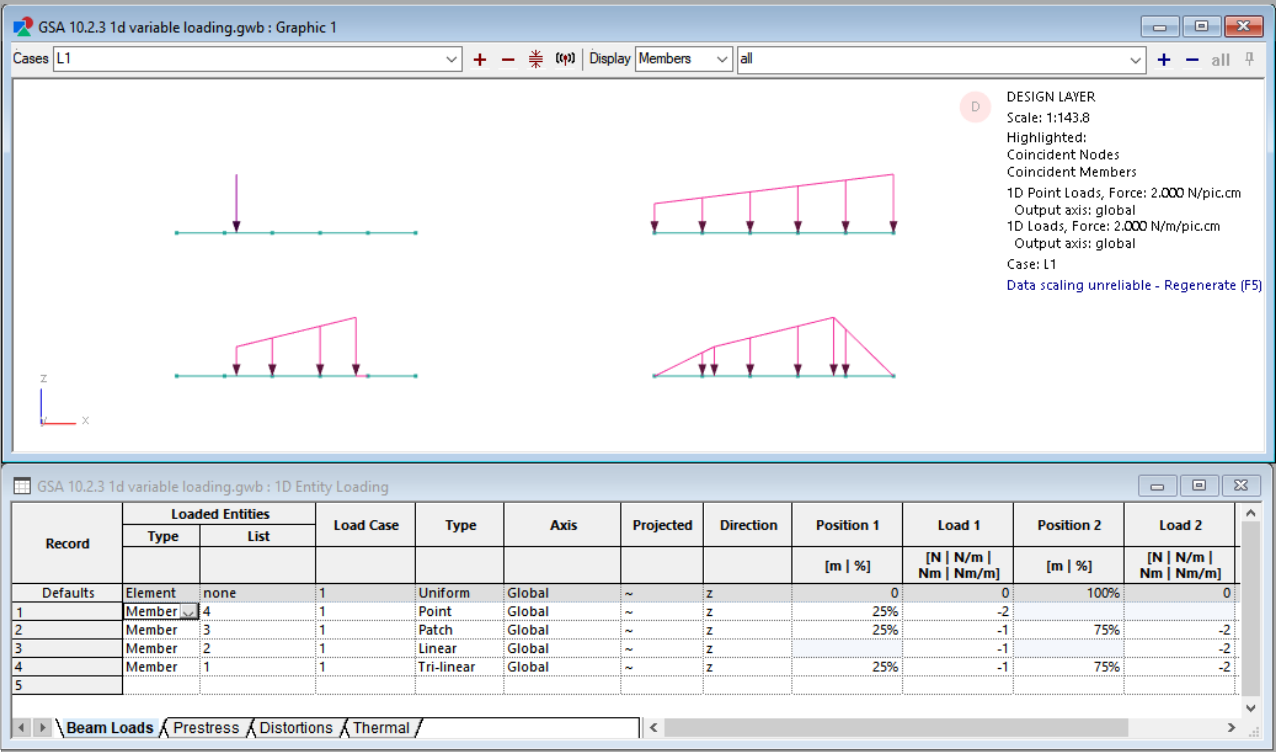
- Point, patch, linear and trilinear beam loads can now be applied onto 1D members. [GSA-7490]
- 2D entity face loads can now be defined by an equation as a function of the entity's position (Pressure = f(x,y,z)). [GSA-6792] See the how-to guide for more information.
- Custom outputs views can now be used to create custom tables for node properties and results. [GSA-7475]
- Custom output views now have alternating shading to make it easier to read results. [GSA-7673]
.NET API
- Improved documentation of the .NET API. See the new Model page for more information.
- GsaAPI (.NET) can now set the position of a point face load. [GSA-5537]
- 2D entity face load by equation can be created with GsaAPI (.NET). [GSA-6792]
- GsaAPI (.NET) can now return Element relative displacement results. [GSA-7100]
- GsaAPI (.NET) now has the ability to return footfall results. [GSA-7392]
- It is now possible to work with Spring properties in GsaAPI (.NET). [GSA-7396]
- Effective length settings for 1D Members can now be set through GsaAPI (.NET). [GSA-7486]
- Steel Section Pool names can now be set through GsaAPI (.NET). [GSA-7491]
- Diagram graphics can now also be returned for members. [GSA-7395]
- GsaAPI.dll is now built against .NET Framework 4.8.
Fixes
Graphic views
- Dummy elements associated with members are now visible on the analysis layer. [GSA-7190]
- Dummy members with constituent elements are now visible on the design layer. [GSA-7562]
- Non-section member types (e.g. spring, damper and link members) now render correctly in graphic views. [GSA-7561]
- Loading diagrams now update when a property referred to by the loaded list changes. [GSA-7593]
- Beam loads with positions near the end of elements now display correctly in loading diagrams. [GSA-7602]
Member and element synchronisation
- The detection and messaging when there are geometry synchronisation errors in 1D members has been improved. [GSA-7378]
- 2-noded 1D members with offsets no longer incorrectly trigger a geometry sync warning. [GSA-7421,GSA-7485]
Analysis
- GSA now gives an appropriate error message when attempting to analyse a model containing tapered beam elements with the nonlinear solver. [GSA-7095]
- GSA now gives an appropriate warning when the material curves are not defined correctly. [GSA-7106]
- Explicit solver analysis checks now fail with a suitable message when load curve has incorrect units. [GSA-7649]
- There is no longer an unexpected reaction force for the primary node of a rigid constraint that also has spring support with zero stiffness. [GSA-7462]
Output views
- GSA no longer crashes when opening "Load Factor/Displacement" output. [GSA-7638]
- Bridge influence analysis results are now fully populated in the output view even if there are gaps on influence effect definitions. [GSA-7467]
- Custom outputs views no longer accepts duplicate output names. [GSA-7665]
- GSA no longer crashes when selecting the total loads and reactions output when a custom output view is open. [GSA-7676]
3D elements
- Stresses are now correctly calculated for 3D wedge elements. [GSA-5015]
- Infinite 3D wedge elements can now be used in the analysis. [GSA-7457]
- Face loads on 3D elements (bricks, wedges, pyramids and tetra) are now applied correctly. [GSA-7464]
GWA files
- Nodal spring and damper results are now included in GWA files. [GSA-7454]
- All 3D element displacement results are now included in GWA results files (previously only nodal values were). [GSA-7455]
- Mode numbers are now read correctly from GWA results files. [GSA-7459]
- Global mode probability results are now included GWA files. [GSA-7460]
- Models with bridge influence line results can now be written correctly to GWA. [GSA-7465]
- GSA no longer writes duplicate 2D element stress results to GWA files for plane stress models. [GSA-7494]
- Modal analysis tasks with custom start mode number and mode numbers higher than 9 can now be correctly read from GWA file. [GSA-7523]
- Total force and moment for 3D elements and grounded springs are now written to GWA file. [GSA-7527]
- Nodal mass and inertia results are now correctly written to (and read from) GWA file. [GSA-7539]
- Storey active mass and inertia results are now included in GWA files. [GSA-7542]
- Grid planes are now written to GSA text files in all available formats (gwa, csv and txt). [GSA-7543]
- Time history time step's time is now written and read from GWA files. [GSA-7565]
- Explicit solver no longer creates a user module with invalid name that cannot be read from GWA. [GSA-7567]
- Explicit solver task results are now written to GWA. [GSA-7568]
- Explicit solver energy and time results are now written to GWA file. [GSA-7583]
- Explicit analysis task nodal constraint forces and moment are now written to GWA files. [GSA-7586]
- All node spring force and moment results are now written to GWA file. [GSA-7636]
- GWA can now handle string values that contain backslashes. [GSA-7641]
- GsRelax load factor results are now written to GWA file. [GSA-7646]
.NET API
- Improved reporting of unavailable results as double.NaN instead of 0 (zero). [GSA-7443]
Deprecated features
- The ability to sculpt patch loads beyond the length of an element has been replaced with 1D member patch loads. [GSA-7518]
- The Map face loads on 2D elements function has been replaced with 2D entity equation face loads. [GSA-6792]
- The map beam loads to shells function, previously found under Tools > Labs, has been removed. [GSA-7535]
Build 10.2.2
October 2023
GSA 10.2.2 is a minor update that resolves the issue when opening models from the network drive using the welcome dialog.
Fixes
- GSA no longer crashes when opening a model from a network drive from the welcome dialog. [GSA-7558]
Build 10.2.1
October 2023
GSA 10.2.1 includes a new What's new screen to alert users when there are new features as well as a few new API functionalities. It also includes a number of fixes related to unexpected crashes, analysis messages and results.
Features
- The GSA welcome screen has been refreshed with a new user interface. [GSA-7083]
- A What's new screen had been added to highlight recent new features. [GSA-7380]
- Custom output views can now be saved to GWA. [GSA-7180]
.NET API
- 1D Element stress results can now be extracted with GsaAPI (.NET). [GSA-7393]
- 1D Member results can now be extracted with GsaAPI (.NET). [GSA-7394]
Fixes
General
- Opening and closing Tools > Customise options... no longer causes the dockable panes to become unresponsive. [GSA-5276,GSA-6470]
- GSA can now merge more than two rigid constraints where the types match and the node list overlap. [GSA-7112]
- 1D Member analysis type terminology across the Properties Pane, Member Wizard, and synchronisation warning messages now consistently use Analysis type instead of Element type. [GSA-7250]
- GSA no longer crashes on using map loading features. [GSA-7428]
- Beam patch loads with relative (%) positions are no longer incorrectly converted based on the model's length units. [GSA-7430]
- GSA now warns users when constituent elements of a member are of a different dimension than the parent member. [GSA-7379,GSA-7387]
- The equation for response spectrum CQC correlation coefficient has been fixed in the documentation. [GSA-7377]
Analysis
- In a modal dynamic analysis where the only result requested is frequency, the effective mass as a function of unrestrained mass is now calculated and output in the analysis messages. [GSA-6003]
- Projected face loads in the global axes are now applied correctly to Pyramid 5 elements. [GSA-6111]
- The structure mass now takes into account any property modifiers and additional mass. The structure weight, total loads and total reactions being reported in total loads and reactions are now correct. [GSA-6248,GSA-6580]
- An unexpected error no longer occurs when running nonlinear static analysis with geometric stiffness on a model that has 2D elements with material defined by a material grade. [GSA-6446]
- Mass analysis no longer fails when the Mass option is set to Exclude element mass. [GSA-7239]
- The ratio of effective mass to unrestrained mass is now displaying correct ratios in the analysis logs. [GSA-7356]
- GSA no longer crashes when re-analysing after terminating an earlier analysis. [GSA-7420]
- GSA no longer prints more than the specified number of repeat warnings of the same type when running analysis. [GSA-7442]
Build 10.2.0
September 2023
GSA 10.2 introduces exciting new features: member loading, custom output views, toolbar for model coordination and improved member-element synchronisation checks. It also includes a number of fixes related to entity definition, materials, analysis results file saving and many additional API improvements.
Features
Loading
- Uniform loads can be applied to members (in the Design layer). [GSA-4457] This includes the following load types:
- 1D entity loading: uniform beam loads, prestress loads, thermal loads
- 2D entity loading: uniform face loads, prestress loads, thermal loads
- 3D entity loading: uniform thermal loads
- Loading diagrams and contours are displayed on the Design layer. [GSA-6789]
Output views
- Create Custom output views for 1D members to combine any selection of geometry, property, analysis and design results all in one table. These custom output views are saved with the GSA file and are automatically updated as the model changes. See the Custom output views references for more information and the How-to guide for step-by-step instructions. [GSA-6824]
- Display expanded case descriptions for permutations for results in output views by going to Further options and checking Expand permutation case description.
- Right-click in any open output view and select Copy output to copy a selection or the entire output. This function copies the entire output or the selected content if a selection exists to clipboard. [GSA-6711,GSA-6768]
Member and element coordination
- The Model coordination toolbar gives easy access to create or delete elements from members and member-element synchronisation tools. [GSA-1806]
- 2D members now have a mesh mode option to allow tri-only, mixed quad/tri and quad-only meshing. Previously all members used the default mixed option, which is still recommended for as a good option for minimising the number of triangle elements while maintaining good mesh quality. [GSA-6990]
- When creating elements from members, GSA gives the option to skip the step of splitting badly shaped quad elements into triangles (e.g. if an all-quad analysis mesh is required). [GSA-7003]
- Member and element relationship checks are carried out before analysing the model. Inconsistencies will be reported in the analysis report. [GSA-7016,GSA-2423]
- Member and element synchronisation checks report any identified geometry differences between member and element for 2D and 3D members. [GSA-7017]
- If there are duplicated elements associated with a member, they can be detected when running member and element synchronisation checks. [GSA-7034]
- Group and dummy status can be synchronised between members and elements. [GSA-7013,GSA-5947]
- Member attributes that affect analysis results are locked when a model has results. [GSA-6914]
- When a load is applied to a member that is out of sync with its constituent elements, a warning is displayed in the analysis report. [GSA-7018]
.NET API
- GSA .NET API has a function to set Load case specification. [GSA-6597]
- GSA .NET API has a function to work with Grid lines. [GSA-6598]
- GSA .NET API has a function to work with uniform 1D/2D thermal loading. [GSA-6757]
- GSA .NET API has the ability to get Name and Definition of a load combination object. [GSA-6826]
- GSA .NET API has a function to draw graphics of a model in the form of Lines, Meshes and Annotation objects. This can be used to draw 3D sections, result and load diagrams. [GSA-6859]
- GSA .NET API fields and methods marked as deprecated in previous version have been removed. [GSA-7040]
- When opening a model with GSA .NET API, it is possible to detect if the file has been saved with a more recent version of GSA. [GSA-7157]
- Analysis logs are available through the API. [GSA-7187]
Analysis
- By default, new modal analysis will use the Specta eigensolver which is 4 to 5 times faster than the previous default (subspace iteration). [GSA-6740]
Fixes
Member and element definition
- Member element geometry checks produce the same results on Update elements from members and Update members from elements operations. [GSA-7197]
- Deleting or recreating elements from members no longer removes nodes used only by dummy members. [GSA-6946]
- Nodes only used by dummy members are no longer displayed as unused in the graphics. [GSA-6946]
- Member offsets output for members with more than two nodes (e.g. 2D members) has been fixed. [GSA-7002]
- GSA no longer produces extremely elongated cutouts when 1D and 2D member (with automatic internal offsets) are nearly co-planar. The cutouts now only occur when the angle between the 2D member's normal the the 1D member's x axis is less than 60 degrees. [GSA-7048]
- 1D void cutter members and 2D member auto internal offsets include member and section offsets. [GSA-7049]
- Element GWA works correctly for parent member in replicas. [GSA-7115]
- GSA no longer crashes when pasting constituent elements that have undefined topology. [GSA-7189]
- GSA no longer crashes when deleting member's constituent elements if the member has blocks. [GSA-7268]
- GSA no longer crashes when a node's target element size is set to a negative value. [GSA-6709]
- GSA no longer crashes on defining 1D generic member on member table even though its constituent elements are ill-defined. [GSA-7193]
- GSA calculates the direction cosines correctly for all 3D (solid) elements. [GSA-5728]
- 1D member automatic offsets are correctly calculated for explicit members. [GSA-7240]
Materials
- Non-linear material curves for some grades of concrete in Eurocodes and IRC-112-2011 no longer contains irregularities. [GSA-7276]
- Mohr-Coulomb materials can now be successfully defined in the Material wizard. [GSA-5875]
Analysis results
- Assembly displacements from response spectrum analysis give the same displacements as nodal displacements. [GSA-5251]
- The story drift results are now correct from response spectrum analysis with SRSS combination. [GSA-6805]
- Spring element displacement results are reporting the correct results for each position along the element. [GSA-5923]
- GSA provides a more detailed breakdown of the time it took to complete different stages of analysis in the analysis report. [GSA-7081]
- GSA consistently reports the effective mass ratio in the analysis report when running a Modal P-Delta analysis. [GSA-6982]
- Analysis task reports are created when analysing via APIs. [GSA-7253]
- Explicit and Masil solvers report a pre-analysis checking message. [GSA-7287]
Design
- The damping value for ASCE 7-10 is correctly assigned as 5%. [GSA-3047]
- GSA no longer crashes when using the Irish National Annex to Eurocode 3. [GSA-6902]
File saving
- GSA correctly stores user unit preferences for time - Medium and Long. [GSA-7039]
- GSA can write angle to a GSA file on saving and read it back on opening. [GSA-7139]
- Models saved by GSA 8.7 with corrupt bridge loading specification can be written to file without error. [GSA-6951]
- 2D member reinforcement can be read from GWA. [GSA-7001]
.NET API
- GSA .NET API always reports Analysis case result values in the Axis default for selected result type. [GSA-6746]
- Grid surface names are validated before being added to the model using the GSA .NET API. [GSA-6766]
- GSA .NET API always reports Combination Case result values in the Axis default for selected result type. [GSA-6819]
- GSA .NET API prevents analysis of models with invalid input. [GSA-7307]
- GSA .NET API throws an exception if unable to open a model, deprecating the ReturnValue enum. [GSA-7188]
- GSA .NET API has the ability to change Strain and Temperature units. [GSA-7031]
- It is possible to retrieve results for nonlinear combination cases through the GSA .NET API. [GSA-5724]
Other
- The Command toolbar is disabled when a model has results, to avoid potential invalid modifications to the model if used. [GSA-7029]
- Some entity properties that don't affect analysis (such as name and colour) can be edited in the tables while the model has results. [GSA-7033]
- It is no longer possible to use the replace function to modify loading of an analysis task that has results. [GSA-7199]
- Assembly labeling options are accessible from the Labels pane when on the design layer. [GSA-6994]
- The Label pane displays polyline information in line with the label and Display wizard. [GSA-6663]
- GsRelax tasks read properly and are not confused with explicit static tasks. [GSA-6953]
Deprecated features
- GsaShell functionality has been deprecated. [GSA-6849]